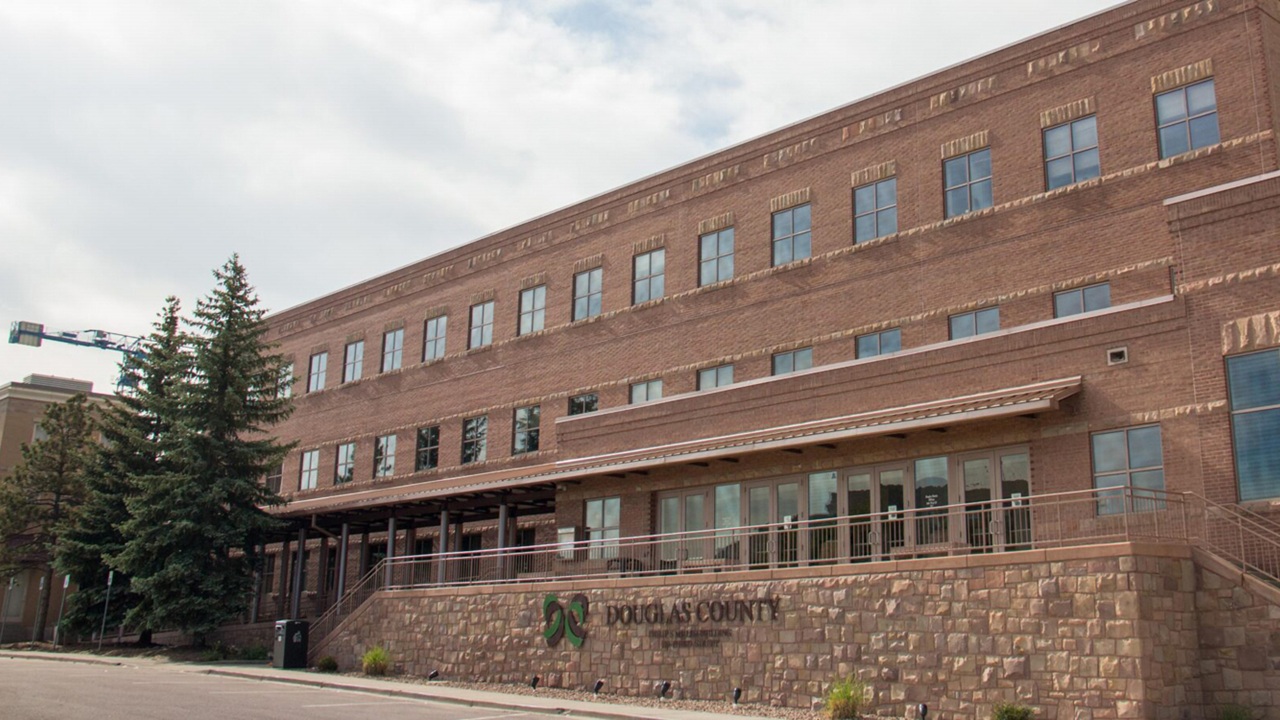
What is getting in the way of generative AI adoption in your organization? Douglas County, Colorado, began asking that question in 2025, when an employee survey found strong interest in generative AI but limited regular use. Eighteen months later, the gap has changed shape rather than disappeared. Some employees use AI regularly; others are experimenting or have yet to find where it fits. What looked like a divide between users and nonusers is now a spectrum of readiness, confidence, and capability—even within a single team.
That changed how we think about adoption. Access and training do not automatically lead to sustained use. What matters is the support employees receive as they start applying AI to real work. Our response is to build an AI adoption ecosystem that meets employees wherever they are on that spectrum and helps each person take the next useful step.
This article focuses on generative AI in everyday knowledge work—not larger implementations requiring more extensive governance, technology, and investment.
What We Tried—and What We Learned
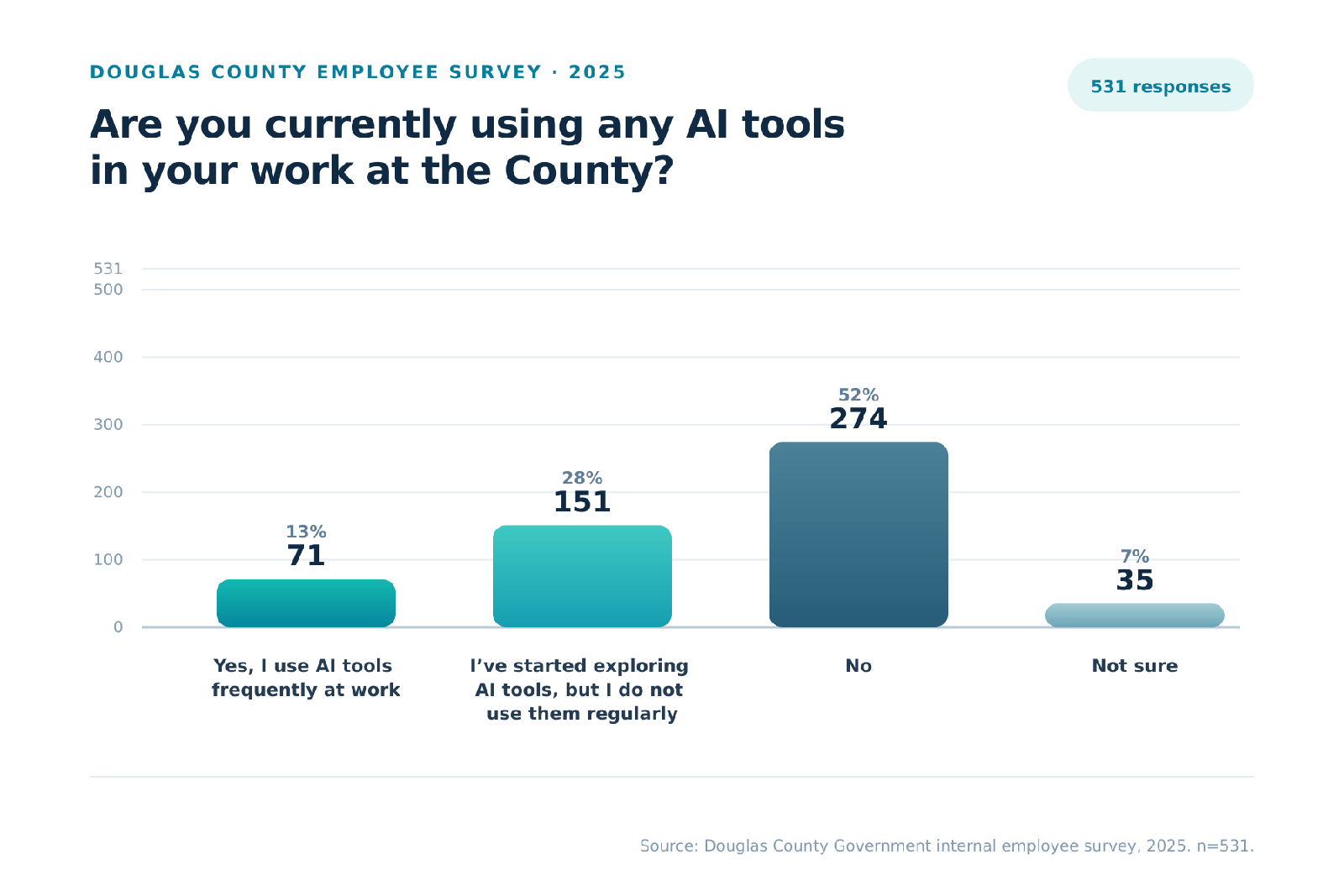
Our 2025 survey gave us an early baseline. More than 500 employees responded—about one-third of the county workforce. Of those, 151 had explored AI, but only 71 used it frequently at work; more than half did not use it at all.
Despite limited regular use, the interest was there. On a five-point scale—where 5 meant very positive and 1 meant very concerned—the average rating was 3.51. Just over half of respondents selected 4 or 5, 31% selected the midpoint, and 18% selected 1 or 2. Employees were broadly open to AI, but they approached it with different levels of confidence and concern.
That combination—interest without regular use—shaped our initial response. We introduced self-paced learning, examples, and use-cases that employees could test, and an AI Champions program that provided AI tool licenses and encouraged experimentation. Roughly 150 licenses were issued.
A year later, about 40 license holders were using the tool at least occasionally. Several factors were at play. For some employees, the tool itself did not meet expectations—the experience felt clunky or inconsistent and did not always produce useful results. Much of the learning also centered on the technology and sample scenarios, leaving employees to make the harder connection for themselves: How does it help me do my job?
For some, that connection came naturally. For others, the combination of an evolving tool, limited time, uncertainty, or difficulty identifying a useful application meant experimentation never became part of regular work. That experience did not lead us away from training or the technology. It led us to rethink what training—and the support around it—needed to look like.
The Adoption Gap Today
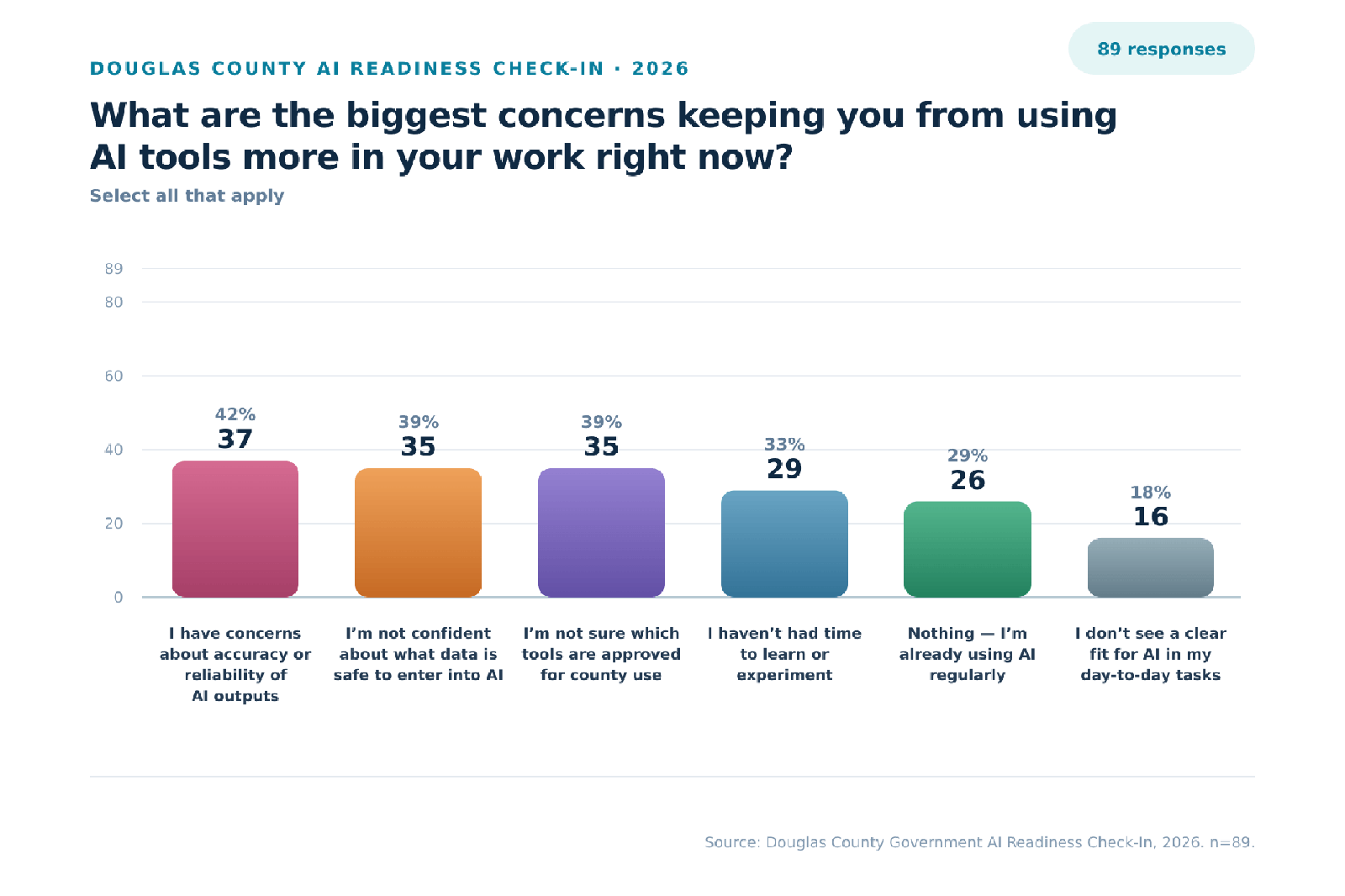
By 2026, the picture had changed but not simplified. Nearly 30% of AI Readiness Check-in respondents said they were already using AI regularly—directionally higher than the 13% who reported frequent use in the larger 2025 survey. At the same time, 18% still did not see a clear fit for AI in day-to-day work, 33% had not had time to learn or experiment, and others remained concerned about accuracy, safe data use, and approved tools. The lesson was clear: adoption was growing, but employees were moving at different speeds and needed different kinds of support.
Our AI “world tour”—a department-by-department listening tour—confirms that pattern. We ask three questions: How are you using AI today? What is getting in the way? What would you like AI to help you do?
Even within the same department, adoption can look very different. One employee may describe AI as part of everyday work, while a colleague is experimenting with a few basic tasks and another has not tried it yet. Some are ready to build repeatable workflows; others are still asking what tools are available, what is safe to use, or where to begin. Employees doing similar work may therefore need very different support.
Building the Bridge Between Training and Use
Our current approach starts with two ideas: training must reflect employees’ work, and support should not end when the class does.
In practice, that bridge combines work-relevant training, a centralized AI Hub, real-world use-case spotlights, peer learning, and hands-on support.
Developed and delivered with a vendor, the AI literacy program uses Douglas County and local-government scenarios to teach responsible use, prompting, and practical application. Employees practice with work they recognize and begin identifying where AI could help.
The AI Hub is an internal resource site with approved-tool information, guidance, short how-to resources, training materials, and county-specific prompts. Use-case spotlights show how colleagues are applying AI to real work, while regular updates and an interactive communication space help employees exchange ideas and continue learning. Office hours and individual working sessions provide somewhere to turn when questions arise during actual work.
Together, these elements create a feedback loop: listen to employee needs, support practical application, capture what works, share it, and improve what comes next.
The most useful support often begins with a real task. In individual working sessions, we ask, “What are you trying to accomplish?” We then examine the task and current process. The answer may be a better prompt, a reusable workflow, stronger source material, a simpler process—or recognition that AI is not the right solution.
Meeting minutes are one example. The fairgrounds team supports roughly 100 board and committee meetings each year. Preparation previously took 30 minutes to two hours; using county-provided tools, the team reduced it to a few minutes—an estimated 80–90% reduction. For community development’s four advisory boards, preparation dropped from five to seven hours per meeting to about 30 minutes, saving roughly 250 hours annually.
Those results required more than asking AI to summarize a transcript. We worked with staff to design workflows that reflected each board’s requirements for content, format, tone, and detail. We also accounted for county recordkeeping requirements, and staff continue to review and approve every draft.
The value is not that AI writes the minutes. It’s that a recurring task became faster, more consistent, and human-reviewed. Once proven, the workflow became an example others could adapt, turning individual support into organizational learning. Adoption happens where new technology meets an employee’s actual work.
Scaling Practical Support
Douglas County is still building and evaluating this approach. A two-person team within the department of strategic solutions leads the work, supported by IT, communications, and staff across departments. The team coordinates the AI listening tour, AI Hub, use-case storytelling, and individual working sessions. Even when a workflow uses existing tools, the broader ecosystem requires staff capacity and ongoing coordination across departments.
That creates its own challenge: the hands-on support that helps close the adoption gap is difficult to scale when it depends on two people.
Rather than continuing the AI Champions model, we are exploring a different approach centered on peer learning and support across departments. Participating employees would share examples from their own work, help colleagues adapt those approaches, facilitate individual working sessions focused on real tasks, and remain connected to the central support structure.
The goal is not to decentralize AI governance; it’s to decentralize practical support.
A Framework Other Governments Can Adapt
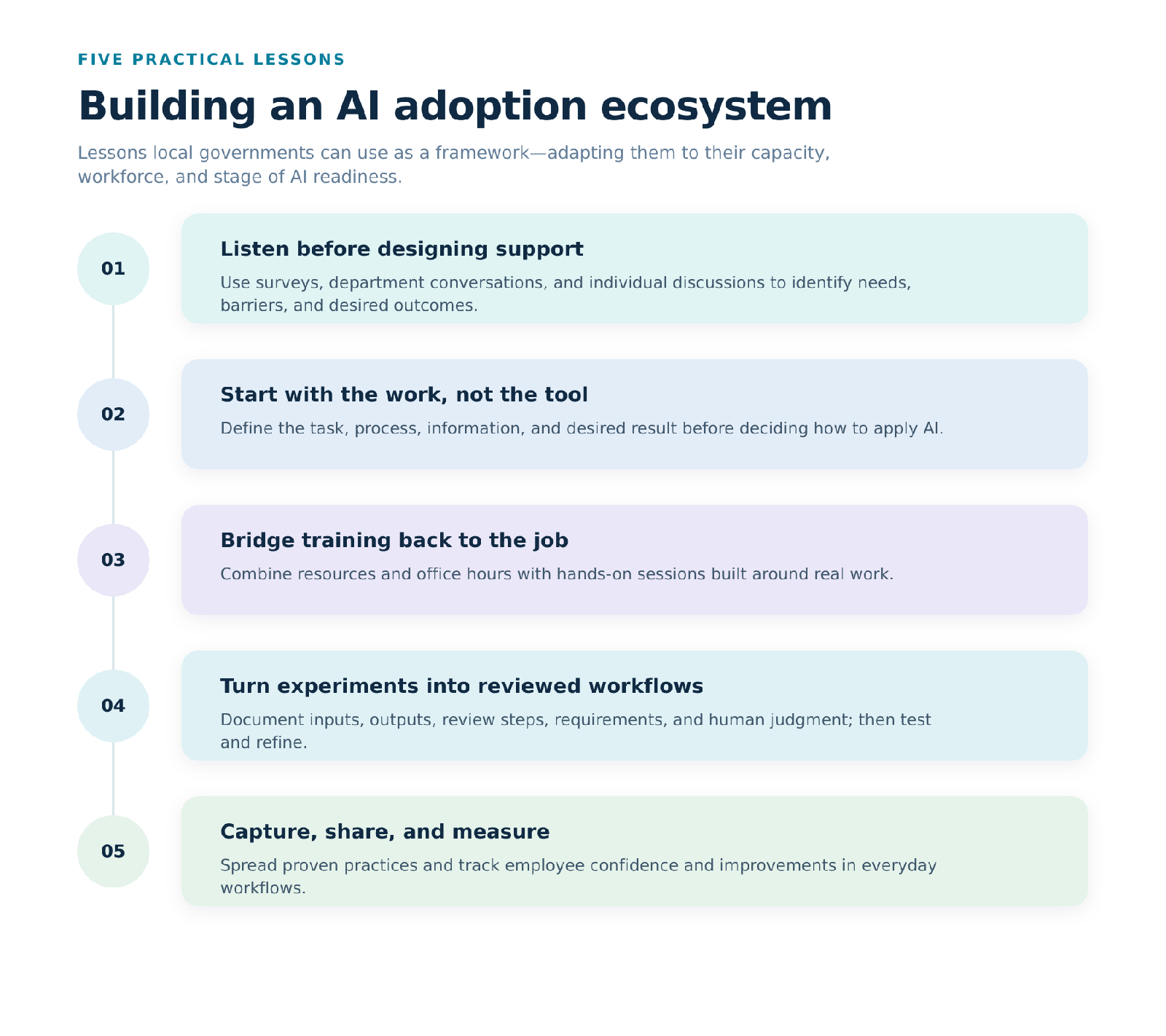
From this experience, five practical lessons have emerged. Together, they offer a framework that other local governments can adapt to their capacity, workforce, and stage of AI readiness.
1. Listen before designing support.
Use multiple channels to ask employees how they are using AI, what is getting in the way, and what they want help accomplishing. Organization-wide surveys can provide a baseline, department conversations can reveal local patterns, and individual discussions can surface needs or concerns that employees may not raise in a group setting.
2. Start with the work, not the tool.
Begin with “What are you trying to accomplish?” Examine the task, process, available information, and required result. The answer may be a prompt, a reusable workflow, a simpler process—or recognition that AI is not the right solution.
3. Build a bridge from training back to the job.
Give employees somewhere to turn when questions arise during actual work. Office hours, approved-tool information, short guides, reusable prompts, and peer discussion provide ongoing support. Individual working sessions or small-group workshops go further by helping employees work through real tasks, troubleshoot barriers, and develop approaches they can reuse.
4. Turn successful experiments into reviewed workflows.
Document the sources, required output, review steps, privacy and recordkeeping requirements, and points requiring human judgment. Test and refine the workflow, adapting it for each department or team as needed.
5. Capture, share, and measure what happens next.
Use-case spotlights, peer-led examples, and internal communication channels can spread practical knowledge and sustain momentum. Measure progress not by licenses issued or training completed, but by greater employee confidence and improvements to everyday workflows.
The framework does not require every jurisdiction to build a large AI program. A smaller organization might begin with one recurring task, one staff lead, a shared resource page, and periodic office hours. A larger organization may need a departmental peer network and a more formal support structure. In either case, practical support can be distributed while governance, privacy, security, and tool approval remain coordinated.
When readiness varies even within the same team, no single training course can close the adoption gap. Going beyond AI training means building an ecosystem that connects learning to everyday work—giving employees at every stage the support to apply AI where it adds value and take the next useful step.
MARYNA SHEVERIA is the special projects manager of strategic solutions (artificial intelligence) for Douglas County, Colorado.
Publish with ICMA!
We’re searching for interesting and insightful stories that can help others learn a memorable takeaway to serve their communities better.
